Zimbra, kalau menurut saya merupakan salah satu mail collaboration. Disebut demikian, karena pada zimbra sudah terdapat email viewer (webmail), sebagai paket utama, kemudian ditambah dengan adanya calendar, dan address book. Fitur yang tak kalah menariknya adalah kita dapat menyimpan dokumen di webmail, dan terdapat plugin-plugin yang disebut zimlet, yang memungkinkan kita untuk berinteraksi dengan banyak hal.
Pada instalasi kali ini, zimbra yang digunakan adalah zimbra versi 5.0.9. paket zimbra bisa didapat di www.zimbra.com. OS yang saya gunakan, tidak standar, karena zimbra merekomendasikan menggunakan RHEL, atau fedora, saya menggunakan Fedora 8. Saya menggunakannya, hanya karena lebih familiar saja, tidak kurang tidak lebih.
Untuk instalasi zimbra ini, ada beberapa syarat yang diperlukan,
1. server smtp yang sudah terinstall, sebaiknya di-uninstall.
pada kondisi standar, Fedora 8 menggunakan sendmail. untuk itu, paket sendmail saya hapus.
# yum erase sendmail
(mudah banget yah, sekarang, sejak pake yum, kalo dulu... uiih... ribet)
2. edit /etc/hosts (xxx itu saya samarkan)
10.x.x.x zimbra.xyz.com zimbra
3. tambahkan di dns record
zimbra IN A 10.x.x.x
IN MX 10 zimbra.xyz.com
3. install juga paket-paket berikut (jika belum)
# yum install curl libidn gmp fetchmail expat libxml libstdc++
4. pada paket fedora 8, libstdc nya tidak cocok dengan paket zimbra yang saya download. untuk itu, saya menggunakan trik, dengan membuatkan symbolic link yang diminta sama zimbra
# ln -s /usr/lib/libstdc++.so.6 /usr/lib/libstdc++.so.5
. setelah itu, extrak paket zimbra
# tar -xvzf zcs-5.0.9_GA_2533.F7.20080815140725
5. masuk ke direktory hasil ekstraksi
# cd zcs-5.0.9_GA_2533.F7.20080815140725/
6. karena yang saya gunakan fedora 8, maka pada saat instalasi perlu ada penambahan opsi pada script installnya
# ./install.sh --platform-override
Operations logged to /tmp/install.log.28179
Checking for existing installation...
zimbra-ldap...NOT FOUND
zimbra-logger...NOT FOUND
zimbra-mta...NOT FOUND
zimbra-snmp...NOT FOUND
zimbra-store...NOT FOUND
zimbra-apache...NOT FOUND
zimbra-spell...NOT FOUND
zimbra-proxy...NOT FOUND
zimbra-archiving...NOT FOUND
zimbra-convertd...NOT FOUND
zimbra-cluster...NOT FOUND
zimbra-core...NOT FOUND
PLEASE READ THIS AGREEMENT CAREFULLY BEFORE USING THE SOFTWARE.
ZIMBRA, INC. ("ZIMBRA") WILL ONLY LICENSE THIS SOFTWARE TO YOU IF YOU
FIRST ACCEPT THE TERMS OF THIS AGREEMENT. BY DOWNLOADING OR INSTALLING
THE SOFTWARE, OR USING THE PRODUCT, YOU ARE CONSENTING TO BE BOUND BY
THIS AGREEMENT. IF YOU DO NOT AGREE TO ALL OF THE TERMS OF THIS
AGREEMENT, THEN DO NOT DOWNLOAD, INSTALL OR USE THE PRODUCT.
License Terms for the Zimbra Collaboration Suite:
http://www.zimbra.com/license/zimbra_public_eula_2.1.html
Press Return to continue
Checking for prerequisites...
NPTL...FOUND
sudo...FOUND sudo-1.6.9p4-2
libidn...FOUND libidn-0.6.14-4
fetchmail...FOUND fetchmail-6.3.8-4
gmp...FOUND gmp-4.2.2-4
/usr/lib/libstdc++.so.5...FOUND
Prerequisite check complete.
Checking for standard system perl...
Checking for installable packages
Found zimbra-core
Found zimbra-ldap
Found zimbra-logger
Found zimbra-mta
Found zimbra-snmp
Found zimbra-store
Found zimbra-apache
Found zimbra-spell
Found zimbra-proxy
Select the packages to install
Install zimbra-ldap [Y]
Install zimbra-logger [Y]
Install zimbra-mta [Y]
Install zimbra-snmp [Y]
Install zimbra-store [Y]
Install zimbra-apache [Y]
Install zimbra-spell [Y]
Install zimbra-proxy [N]
Checking required space for zimbra-core
checking space for zimbra-store
Installing:
zimbra-core
zimbra-ldap
zimbra-logger
zimbra-mta
zimbra-snmp
zimbra-store
zimbra-apache
zimbra-spell
You appear to be installing packages on a platform different
than the platform for which they were built.
This platform is UNKNOWN
Packages found: F7
This may or may not work.
Using packages for a platform in which they were not designed for
may result in an installation that is NOT usable. Your support
options may be limited if you choose to continue.
The system will be modified. Continue? [N] Y
Removing /opt/zimbra
Installing packages
zimbra-core......zimbra-core-5.0.9_GA_2533.F7-20080815140725.i386.rpm...done
zimbra-ldap......zimbra-ldap-5.0.9_GA_2533.F7-20080815140725.i386.rpm...done
zimbra-logger......zimbra-logger-5.0.9_GA_2533.F7-20080815140725.i386.rpm..done
zimbra-mta......zimbra-mta-5.0.9_GA_2533.F7-20080815140725.i386.rpm...done
zimbra-snmp......zimbra-snmp-5.0.9_GA_2533.F7-20080815140725.i386.rpm...done
zimbra-store......zimbra-store-5.0.9_GA_2533.F7-20080815140725.i386.rpm...done
zimbra-apache......zimbra-apache-5.0.9_GA_2533.F7-20080815140725.i386.rpm...done
zimbra-spell......zimbra-spell-5.0.9_GA_2533.F7-20080815140725.i386.rpm...done
Operations logged to /tmp/zmsetup.01001900-0000170115364.log
Setting defaults... MX: zimbra.xyz.com (10.x.x.x)
Interface: 10.x.x.x
Interface: 127.0.0.1
10.x.x.x
done.
Checking for port conflicts
7. Sampai di atas , instalasi sudah selesai dilakukan. tahap selanjutnya, kita konfigurasi main menu. yang perlu di ubah hanya memasukkan password
Main menu
1) Common Configuration:
2) zimbra-ldap: Enabled
3) zimbra-store: Enabled
+Create Admin User: yes
+Admin user to create: admin@zimbra.xyz.com
******* +Admin Password UNSET
+Enable automated spam training: yes
+Spam training user: spam.tdyj55qoy@zimbra.xyz.com
+Non-spam(Ham) training user: ham.ehjpoawcw2@zimbra.xyz.com
+Global Documents Account: wiki@zimbra.xyz.com
+SMTP host: zimbra.xyz.com
+Web server HTTP port: 80
+Web server HTTPS port: 443
+Web server mode: http
+IMAP server port: 143
+IMAP server SSL port: 993
+POP server port: 110
+POP server SSL port: 995
+Use spell check server: yes
+Spell server URL: http://zimbra.xyz.com:7780/aspell.php
+Configure store for use with reverse mail proxy: FALSE
+Configure store for use with reverse web proxy: FALSE
4) zimbra-mta: Enabled
5) zimbra-snmp: Enabled
6) zimbra-logger: Enabled
7) zimbra-spell: Enabled
8) Default Class of Service Configuration:
r) Start servers after configuration yes
s) Save config to file
x) Expand menu
q) Quit
Address unconfigured (**) items (? - help) 3
Password for admin@zimbra.xyz.com (min 6 characters): [6lBPUxam0] password
Store configuration
1) Status: Enabled
2) Create Admin User: yes
3) Admin user to create: admin@zimbra.xyz.com
4) Admin Password set
5) Enable automated spam training: yes
6) Spam training user: spam.tdyj55qoy@zimbra.xyz.com
7) Non-spam(Ham) training user: ham.ehjpoawcw2@zimbra.xyz.com
8) Global Documents Account: wiki@zimbra.xyz.com
9) SMTP host: zimbra.xyz.com
10) Web server HTTP port: 80
11) Web server HTTPS port: 443
12) Web server mode: http
13) IMAP server port: 143
14) IMAP server SSL port: 993
15) POP server port: 110
16) POP server SSL port: 995
17) Use spell check server: yes
18) Spell server URL: http://zimbra.xyz.com:7780/aspell.php
19) Configure store for use with reverse mail proxy: FALSE
20) Configure store for use with reverse web proxy: FALSE
Select, or 'r' for previous menu [r] r
Main menu
1) Common Configuration:
2) zimbra-ldap: Enabled
3) zimbra-store: Enabled
4) zimbra-mta: Enabled
5) zimbra-snmp: Enabled
6) zimbra-logger: Enabled
7) zimbra-spell: Enabled
8) Default Class of Service Configuration:
r) Start servers after configuration yes
s) Save config to file
x) Expand menu
q) Quit
*** CONFIGURATION COMPLETE - press 'a' to apply
Select from menu, or press 'a' to apply config (? - help) a
Save configuration data to a file? [Yes]
Save config in file: [/opt/zimbra/config.31469]
Saving config in /opt/zimbra/config.31469...done.
The system will be modified - continue? [No]
*** CONFIGURATION COMPLETE - press 'a' to apply
Select from menu, or press 'a' to apply config (? - help) a
Save configuration data to a file? [Yes]
Save config in file: [/opt/zimbra/config.31469]
Saving config in /opt/zimbra/config.31469...done.
The system will be modified - continue? [No] y
Operations logged to /tmp/zmsetup.01001900-0000170115364.log
Setting local config values...done.
Setting up CA...done.
Deploying CA to /opt/zimbra/conf/ca ...done.
Creating SSL certificate...done.
Installing mailboxd SSL certificates...done.
Initializing ldap...failed. (28416)
ERROR
Configuration failed
Please address the error and re-run /opt/zimbra/libexec/zmsetup.pl to
complete the configuration.
Errors have been logged to /tmp/zmsetup.01001900-0000170115364.log
Save config in file: [/opt/zimbra/config.2450]
Saving config in /opt/zimbra/config.2450...done.
The system will be modified - continue? [No] yes
Operations logged to /tmp/zmsetup.01001900-0000159814112.log
Initializing ldap...done.
Setting replication password...done.
Setting Postfix password...done.
Setting amavis password...done.
Setting nginx password...
pada saat konfigurasi, terdapat eror di
Initializing ldap...failed. (28416)
setelah baca di log nya, ternyata ldap nya butuh sudo. Ini bunyi log nya
Tue Sep 23 09:28:07 2008 zimbra-ldap is enabled
Tue Sep 23 09:28:07 2008 Initializing ldap...
Tue Sep 23 09:28:07 2008 *** Running as zimbra user: /opt/zimbra/libexec/zmldapinit
sudo: sorry, you must have a tty to run sudo
sudo: sorry, you must have a tty to run sudo
sudo: sorry, you must have a tty to run sudo
sudo: sorry, you must have a tty to run sudo
sudo: sorry, you must have a tty to run sudo
sudo: sorry, you must have a tty to run sudo
sudo: sorry, you must have a tty to run sudo
IO::Socket::INET: connect: Connection refused at /opt/zimbra/libexec/zmldapinit line 160.
Tue Sep 23 09:28:59 2008 failed. (28416)
Tue Sep 23 09:28:59 2008
ERROR
Tue Sep 23 09:28:59 2008
Configuration failed
7. edit /etc/sudoers
edit baris ini
Defaults requiretty
menjadi
#Defaults requiretty
8. jalankan /opt/zimbra/libexec/zmsetup.pl
#/opt/zimbra/libexec/zmsetup.pl
Operations logged to /tmp/zmsetup.01001900-0000159814112.log
Setting defaults... MX: zimbra.xyz.com (10.x.x.x)
Interface: 10.x.x.x
Interface: 127.0.0.1
10.x.x.x
done.
Checking for port conflicts
Note
The previous configuration appears to have failed to complete
Attempt to complete configuration now? [yes]
Save configuration data to a file? [Yes]
Save config in file: [/opt/zimbra/config.2450]
Saving config in /opt/zimbra/config.2450...done.
The system will be modified - continue? [No] yes
Operations logged to /tmp/zmsetup.01001900-0000159814112.log
Initializing ldap...done.
Setting replication password...done.
Setting Postfix password...done.
Setting amavis password...done.
Setting nginx password...done.
Saving CA in ldap ...done.
Creating server entry for zimbra.xyz.com...done.
Saving SSL Certificate in ldap ...done.
Setting spell check URL...done.
Setting service ports on zimbra.xyz.com...done.
Adding zimbra.xyz.com to zimbraMailHostPool in default COS...done.
Installing skins...
beach
zmail
hotrod
steel
sand
lemongrass
lavender
bones
bare
waves
yahoo
sky
done.
Setting zimbraFeatureIMEnabled=FALSE...done.
Setting zimbraFeatureTasksEnabled=TRUE...done.
Setting zimbraFeatureBriefcasesEnabled=TRUE...done.
Setting zimbraFeatureNotebookEnabled=TRUE...done.
Setting MTA auth host...done.
Setting TimeZone Preference...done.
Creating domain zimbra.xyz.com...done.
Creating user admin@zimbra.xyz.com...done.
Creating postmaster alias...done.
Creating user wiki@zimbra.xyz.com...done.
Creating user spam.oewrhhdg@zimbra.xyz.com...done.
Creating user ham.fqkdxmpi@zimbra.xyz.com...done.
Setting spam training accounts...done.
Initializing store sql database...done.
Setting zimbraSmtpHostname for zimbra.xyz.com...done.
Initializing logger sql database...done.
Initializing mta config...done.
Configuring SNMP...done.
Setting services on zimbra.xyz.com...done.
Setting up syslog.conf...cp: cannot stat `/etc/syslog.conf': No such file or directory
grep: /etc/syslog.conf: No such file or directory
syslogd: no process killed
Failed
You have the option of notifying Zimbra of your installation.
This helps us to track the uptake of the Zimbra Collaboration Suite.
The only information that will be transmitted is:
The VERSION of zcs installed (5.0.9_GA_2533_UNKNOWN)
The ADMIN EMAIL ADDRESS created (admin@zimbra.xyz.com)
Notify Zimbra of your installation? [Yes]
Starting servers...
Starting servers...done.
Checking for deprecated zimlets...done.
Installing zimlets...
com_zimbra_local
com_zimbra_phone
com_zimbra_url
com_zimbra_date
com_zimbra_email
com_zimbra_ymemoticons
com_zimbra_cert_manager
done.
Initializing Documents...done.
Restarting mailboxd...
Checking for deprecated zimlets...done.
Installing zimlets...
com_zimbra_local
com_zimbra_phone
com_zimbra_url
com_zimbra_date
com_zimbra_email
com_zimbra_ymemoticons
com_zimbra_cert_manager
done.
Initializing Documents...done.
Restarting mailboxd...done.
Setting up zimbra crontab...done.
Moving /tmp/zmsetup.01001900-0000159814112.log to /opt/zimbra/log
Configuration complete - press return to exit
9. instalasi zimbra komplit.
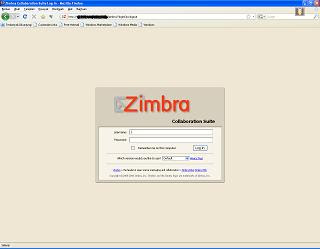
tampilan zimbra
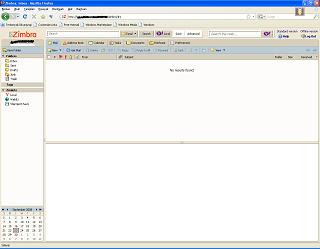
tampilan setelah login
10. jangan lupa membuat account user. untuk ini kita harus login sebagai admin. alamatnya :
https://localhost:7071
11. selesai deh ...
Rito
Pada instalasi kali ini, zimbra yang digunakan adalah zimbra versi 5.0.9. paket zimbra bisa didapat di www.zimbra.com. OS yang saya gunakan, tidak standar, karena zimbra merekomendasikan menggunakan RHEL, atau fedora, saya menggunakan Fedora 8. Saya menggunakannya, hanya karena lebih familiar saja, tidak kurang tidak lebih.
Untuk instalasi zimbra ini, ada beberapa syarat yang diperlukan,
1. server smtp yang sudah terinstall, sebaiknya di-uninstall.
pada kondisi standar, Fedora 8 menggunakan sendmail. untuk itu, paket sendmail saya hapus.
# yum erase sendmail
(mudah banget yah, sekarang, sejak pake yum, kalo dulu... uiih... ribet)
2. edit /etc/hosts (xxx itu saya samarkan)
10.x.x.x zimbra.xyz.com zimbra
3. tambahkan di dns record
zimbra IN A 10.x.x.x
IN MX 10 zimbra.xyz.com
3. install juga paket-paket berikut (jika belum)
# yum install curl libidn gmp fetchmail expat libxml libstdc++
4. pada paket fedora 8, libstdc nya tidak cocok dengan paket zimbra yang saya download. untuk itu, saya menggunakan trik, dengan membuatkan symbolic link yang diminta sama zimbra
# ln -s /usr/lib/libstdc++.so.6 /usr/lib/libstdc++.so.5
. setelah itu, extrak paket zimbra
# tar -xvzf zcs-5.0.9_GA_2533.F7.20080815140725
5. masuk ke direktory hasil ekstraksi
# cd zcs-5.0.9_GA_2533.F7.20080815140725/
6. karena yang saya gunakan fedora 8, maka pada saat instalasi perlu ada penambahan opsi pada script installnya
# ./install.sh --platform-override
Operations logged to /tmp/install.log.28179
Checking for existing installation...
zimbra-ldap...NOT FOUND
zimbra-logger...NOT FOUND
zimbra-mta...NOT FOUND
zimbra-snmp...NOT FOUND
zimbra-store...NOT FOUND
zimbra-apache...NOT FOUND
zimbra-spell...NOT FOUND
zimbra-proxy...NOT FOUND
zimbra-archiving...NOT FOUND
zimbra-convertd...NOT FOUND
zimbra-cluster...NOT FOUND
zimbra-core...NOT FOUND
PLEASE READ THIS AGREEMENT CAREFULLY BEFORE USING THE SOFTWARE.
ZIMBRA, INC. ("ZIMBRA") WILL ONLY LICENSE THIS SOFTWARE TO YOU IF YOU
FIRST ACCEPT THE TERMS OF THIS AGREEMENT. BY DOWNLOADING OR INSTALLING
THE SOFTWARE, OR USING THE PRODUCT, YOU ARE CONSENTING TO BE BOUND BY
THIS AGREEMENT. IF YOU DO NOT AGREE TO ALL OF THE TERMS OF THIS
AGREEMENT, THEN DO NOT DOWNLOAD, INSTALL OR USE THE PRODUCT.
License Terms for the Zimbra Collaboration Suite:
http://www.zimbra.com/license/zimbra_public_eula_2.1.html
Press Return to continue
Checking for prerequisites...
NPTL...FOUND
sudo...FOUND sudo-1.6.9p4-2
libidn...FOUND libidn-0.6.14-4
fetchmail...FOUND fetchmail-6.3.8-4
gmp...FOUND gmp-4.2.2-4
/usr/lib/libstdc++.so.5...FOUND
Prerequisite check complete.
Checking for standard system perl...
Checking for installable packages
Found zimbra-core
Found zimbra-ldap
Found zimbra-logger
Found zimbra-mta
Found zimbra-snmp
Found zimbra-store
Found zimbra-apache
Found zimbra-spell
Found zimbra-proxy
Select the packages to install
Install zimbra-ldap [Y]
Install zimbra-logger [Y]
Install zimbra-mta [Y]
Install zimbra-snmp [Y]
Install zimbra-store [Y]
Install zimbra-apache [Y]
Install zimbra-spell [Y]
Install zimbra-proxy [N]
Checking required space for zimbra-core
checking space for zimbra-store
Installing:
zimbra-core
zimbra-ldap
zimbra-logger
zimbra-mta
zimbra-snmp
zimbra-store
zimbra-apache
zimbra-spell
You appear to be installing packages on a platform different
than the platform for which they were built.
This platform is UNKNOWN
Packages found: F7
This may or may not work.
Using packages for a platform in which they were not designed for
may result in an installation that is NOT usable. Your support
options may be limited if you choose to continue.
The system will be modified. Continue? [N] Y
Removing /opt/zimbra
Installing packages
zimbra-core......zimbra-core-5.0.9_GA_2533.F7-20080815140725.i386.rpm...done
zimbra-ldap......zimbra-ldap-5.0.9_GA_2533.F7-20080815140725.i386.rpm...done
zimbra-logger......zimbra-logger-5.0.9_GA_2533.F7-20080815140725.i386.rpm..done
zimbra-mta......zimbra-mta-5.0.9_GA_2533.F7-20080815140725.i386.rpm...done
zimbra-snmp......zimbra-snmp-5.0.9_GA_2533.F7-20080815140725.i386.rpm...done
zimbra-store......zimbra-store-5.0.9_GA_2533.F7-20080815140725.i386.rpm...done
zimbra-apache......zimbra-apache-5.0.9_GA_2533.F7-20080815140725.i386.rpm...done
zimbra-spell......zimbra-spell-5.0.9_GA_2533.F7-20080815140725.i386.rpm...done
Operations logged to /tmp/zmsetup.01001900-0000170115364.log
Setting defaults... MX: zimbra.xyz.com (10.x.x.x)
Interface: 10.x.x.x
Interface: 127.0.0.1
10.x.x.x
done.
Checking for port conflicts
7. Sampai di atas , instalasi sudah selesai dilakukan. tahap selanjutnya, kita konfigurasi main menu. yang perlu di ubah hanya memasukkan password
Main menu
1) Common Configuration:
2) zimbra-ldap: Enabled
3) zimbra-store: Enabled
+Create Admin User: yes
+Admin user to create: admin@zimbra.xyz.com
******* +Admin Password UNSET
+Enable automated spam training: yes
+Spam training user: spam.tdyj55qoy@zimbra.xyz.com
+Non-spam(Ham) training user: ham.ehjpoawcw2@zimbra.xyz.com
+Global Documents Account: wiki@zimbra.xyz.com
+SMTP host: zimbra.xyz.com
+Web server HTTP port: 80
+Web server HTTPS port: 443
+Web server mode: http
+IMAP server port: 143
+IMAP server SSL port: 993
+POP server port: 110
+POP server SSL port: 995
+Use spell check server: yes
+Spell server URL: http://zimbra.xyz.com:7780/aspell.php
+Configure store for use with reverse mail proxy: FALSE
+Configure store for use with reverse web proxy: FALSE
4) zimbra-mta: Enabled
5) zimbra-snmp: Enabled
6) zimbra-logger: Enabled
7) zimbra-spell: Enabled
8) Default Class of Service Configuration:
r) Start servers after configuration yes
s) Save config to file
x) Expand menu
q) Quit
Address unconfigured (**) items (? - help) 3
Password for admin@zimbra.xyz.com (min 6 characters): [6lBPUxam0] password
Store configuration
1) Status: Enabled
2) Create Admin User: yes
3) Admin user to create: admin@zimbra.xyz.com
4) Admin Password set
5) Enable automated spam training: yes
6) Spam training user: spam.tdyj55qoy@zimbra.xyz.com
7) Non-spam(Ham) training user: ham.ehjpoawcw2@zimbra.xyz.com
8) Global Documents Account: wiki@zimbra.xyz.com
9) SMTP host: zimbra.xyz.com
10) Web server HTTP port: 80
11) Web server HTTPS port: 443
12) Web server mode: http
13) IMAP server port: 143
14) IMAP server SSL port: 993
15) POP server port: 110
16) POP server SSL port: 995
17) Use spell check server: yes
18) Spell server URL: http://zimbra.xyz.com:7780/aspell.php
19) Configure store for use with reverse mail proxy: FALSE
20) Configure store for use with reverse web proxy: FALSE
Select, or 'r' for previous menu [r] r
Main menu
1) Common Configuration:
2) zimbra-ldap: Enabled
3) zimbra-store: Enabled
4) zimbra-mta: Enabled
5) zimbra-snmp: Enabled
6) zimbra-logger: Enabled
7) zimbra-spell: Enabled
8) Default Class of Service Configuration:
r) Start servers after configuration yes
s) Save config to file
x) Expand menu
q) Quit
*** CONFIGURATION COMPLETE - press 'a' to apply
Select from menu, or press 'a' to apply config (? - help) a
Save configuration data to a file? [Yes]
Save config in file: [/opt/zimbra/config.31469]
Saving config in /opt/zimbra/config.31469...done.
The system will be modified - continue? [No]
*** CONFIGURATION COMPLETE - press 'a' to apply
Select from menu, or press 'a' to apply config (? - help) a
Save configuration data to a file? [Yes]
Save config in file: [/opt/zimbra/config.31469]
Saving config in /opt/zimbra/config.31469...done.
The system will be modified - continue? [No] y
Operations logged to /tmp/zmsetup.01001900-0000170115364.log
Setting local config values...done.
Setting up CA...done.
Deploying CA to /opt/zimbra/conf/ca ...done.
Creating SSL certificate...done.
Installing mailboxd SSL certificates...done.
Initializing ldap...failed. (28416)
ERROR
Configuration failed
Please address the error and re-run /opt/zimbra/libexec/zmsetup.pl to
complete the configuration.
Errors have been logged to /tmp/zmsetup.01001900-0000170115364.log
Save config in file: [/opt/zimbra/config.2450]
Saving config in /opt/zimbra/config.2450...done.
The system will be modified - continue? [No] yes
Operations logged to /tmp/zmsetup.01001900-0000159814112.log
Initializing ldap...done.
Setting replication password...done.
Setting Postfix password...done.
Setting amavis password...done.
Setting nginx password...
pada saat konfigurasi, terdapat eror di
Initializing ldap...failed. (28416)
setelah baca di log nya, ternyata ldap nya butuh sudo. Ini bunyi log nya
Tue Sep 23 09:28:07 2008 zimbra-ldap is enabled
Tue Sep 23 09:28:07 2008 Initializing ldap...
Tue Sep 23 09:28:07 2008 *** Running as zimbra user: /opt/zimbra/libexec/zmldapinit
sudo: sorry, you must have a tty to run sudo
sudo: sorry, you must have a tty to run sudo
sudo: sorry, you must have a tty to run sudo
sudo: sorry, you must have a tty to run sudo
sudo: sorry, you must have a tty to run sudo
sudo: sorry, you must have a tty to run sudo
sudo: sorry, you must have a tty to run sudo
IO::Socket::INET: connect: Connection refused at /opt/zimbra/libexec/zmldapinit line 160.
Tue Sep 23 09:28:59 2008 failed. (28416)
Tue Sep 23 09:28:59 2008
ERROR
Tue Sep 23 09:28:59 2008
Configuration failed
7. edit /etc/sudoers
edit baris ini
Defaults requiretty
menjadi
#Defaults requiretty
8. jalankan /opt/zimbra/libexec/zmsetup.pl
#/opt/zimbra/libexec/zmsetup.pl
Operations logged to /tmp/zmsetup.01001900-0000159814112.log
Setting defaults... MX: zimbra.xyz.com (10.x.x.x)
Interface: 10.x.x.x
Interface: 127.0.0.1
10.x.x.x
done.
Checking for port conflicts
Note
The previous configuration appears to have failed to complete
Attempt to complete configuration now? [yes]
Save configuration data to a file? [Yes]
Save config in file: [/opt/zimbra/config.2450]
Saving config in /opt/zimbra/config.2450...done.
The system will be modified - continue? [No] yes
Operations logged to /tmp/zmsetup.01001900-0000159814112.log
Initializing ldap...done.
Setting replication password...done.
Setting Postfix password...done.
Setting amavis password...done.
Setting nginx password...done.
Saving CA in ldap ...done.
Creating server entry for zimbra.xyz.com...done.
Saving SSL Certificate in ldap ...done.
Setting spell check URL...done.
Setting service ports on zimbra.xyz.com...done.
Adding zimbra.xyz.com to zimbraMailHostPool in default COS...done.
Installing skins...
beach
zmail
hotrod
steel
sand
lemongrass
lavender
bones
bare
waves
yahoo
sky
done.
Setting zimbraFeatureIMEnabled=FALSE...done.
Setting zimbraFeatureTasksEnabled=TRUE...done.
Setting zimbraFeatureBriefcasesEnabled=TRUE...done.
Setting zimbraFeatureNotebookEnabled=TRUE...done.
Setting MTA auth host...done.
Setting TimeZone Preference...done.
Creating domain zimbra.xyz.com...done.
Creating user admin@zimbra.xyz.com...done.
Creating postmaster alias...done.
Creating user wiki@zimbra.xyz.com...done.
Creating user spam.oewrhhdg@zimbra.xyz.com...done.
Creating user ham.fqkdxmpi@zimbra.xyz.com...done.
Setting spam training accounts...done.
Initializing store sql database...done.
Setting zimbraSmtpHostname for zimbra.xyz.com...done.
Initializing logger sql database...done.
Initializing mta config...done.
Configuring SNMP...done.
Setting services on zimbra.xyz.com...done.
Setting up syslog.conf...cp: cannot stat `/etc/syslog.conf': No such file or directory
grep: /etc/syslog.conf: No such file or directory
syslogd: no process killed
Failed
You have the option of notifying Zimbra of your installation.
This helps us to track the uptake of the Zimbra Collaboration Suite.
The only information that will be transmitted is:
The VERSION of zcs installed (5.0.9_GA_2533_UNKNOWN)
The ADMIN EMAIL ADDRESS created (admin@zimbra.xyz.com)
Notify Zimbra of your installation? [Yes]
Starting servers...
Starting servers...done.
Checking for deprecated zimlets...done.
Installing zimlets...
com_zimbra_local
com_zimbra_phone
com_zimbra_url
com_zimbra_date
com_zimbra_email
com_zimbra_ymemoticons
com_zimbra_cert_manager
done.
Initializing Documents...done.
Restarting mailboxd...
Checking for deprecated zimlets...done.
Installing zimlets...
com_zimbra_local
com_zimbra_phone
com_zimbra_url
com_zimbra_date
com_zimbra_email
com_zimbra_ymemoticons
com_zimbra_cert_manager
done.
Initializing Documents...done.
Restarting mailboxd...done.
Setting up zimbra crontab...done.
Moving /tmp/zmsetup.01001900-0000159814112.log to /opt/zimbra/log
Configuration complete - press return to exit
9. instalasi zimbra komplit.
tampilan zimbra

tampilan setelah login

10. jangan lupa membuat account user. untuk ini kita harus login sebagai admin. alamatnya :
https://localhost:7071
11. selesai deh ...
Rito
Komentar